|



| |
DiggerBread Tips & Tricks
Index of this page:
- What this is
- Overview of Google Groups
- Email options you can change
- Group archive
- "I can't see anything"
- "I don't have Gmail..."
|
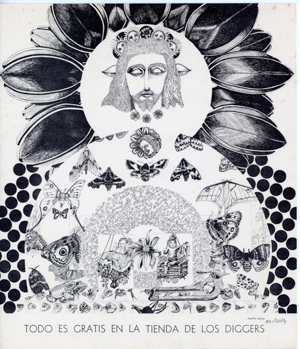
"Todo es gratis en la tienda de los Diggers" ("Everything is free in the
Diggers' store"). Poster by Martin Carey. [Click image to zoom in. Then click
again to zoom out.]
|
What This Is
In 2012, Coyote's brainstorm inspired the first version of DiggerBread, a
mutual support group that helps provide financial assistance to ex-Diggers,
ex-Black Bear Ranch folks. We had a bit of a tussle in the first few months
when there was talk of selling crafts, something original Diggers objected
to. We renamed the group Free Family Union and that was the name we used for
the next thirteen years. Until the email listserve died. We then created a
new email group on Google, but the old name was reserved. So we went back to
DiggerBread because (1) there has been no further talk of buying and selling
and (2) Coyote's original name is just too damn sweet (double or triple
entendre and all). Now we're all on the new Google group, and there are
some very cool things we can do that weren't possible before
(like seeing the full membership list). There are options
that everyone has for cutting down on the number of emails
in the inbox. So that's what this page is for. To help
explain how to use the
DiggerBread web portal.
[Top] |
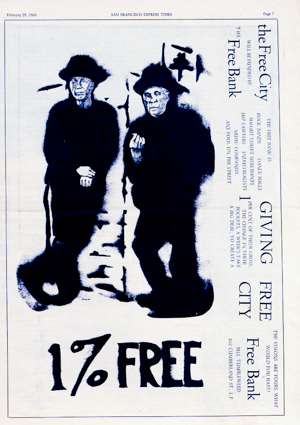
The Free City Bank page from the February 29, 1968 issue of the San
Francisco Express Times. [Click image to zoom in. Then click again to zoom
out.]
|
Overview of Google Groups
DiggerBread now lives on Google Groups, which is basically a members-only
mailing list with a web page attached. Anything you send to diggerbread at googlegroups dot com
goes out to every member's inbox, exactly like the old listserve did. The
difference is that Google also keeps a running web archive of every post
(see "Group Archive" below), and it gives each member some control over how
— or whether — messages land in their inbox (see "Email Options" below).
To use the group, you'll need a free Google account (a Gmail address
works, but so does any email address you've registered with Google). Once
you're signed in at
groups.google.com and a member of DiggerBread, you can browse old posts,
start a new conversation, reply to one, and see the full membership list —
something the old listserve never let us do. If you'd rather just keep using
email the way you always have, you can ignore the web interface entirely and
DiggerBread will work the same as it always did.
[Top] |
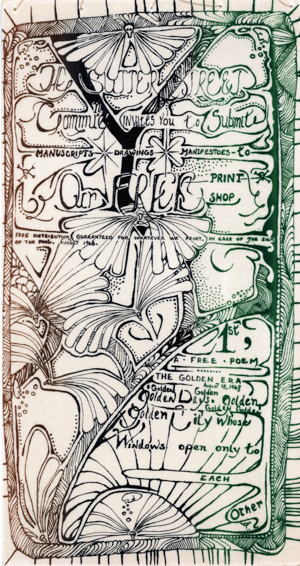
Announcement for the opening of the
Free Print Shop by the Sutter Street
Commune in 1968. David Simpson and Vinnie Rinaldi convinced Irving Rosenthal
to let Vinnie go to New York City and bring back Irving's print shop to put
into service for Free City. [Click image to zoom in. Then
click again to zoom out.]
|
Email Options
If your inbox is getting crowded, Google Groups gives you a few ways
to dial DiggerBread traffic up or down without leaving the group. Sign
in at
groups.google.com, click on DiggerBread, then go to "My settings"
(sometimes shown as the little person icon or "My membership settings")
to choose how you receive messages:
- Each email — the old-school way. Every post arrives in
your inbox as its own message, same as the listserve always did.
- Digest email — up to 25 messages bundled into a single
daily email, so your inbox gets one message instead of a dozen.
- Abridged email — a daily summary with just the subject
lines and the first bit of each message, with links to read the rest
on the web.
- No email — nothing lands in your inbox at all. You'll
only see posts if you visit the group's web page directly. Good for
folks who want to stay a member but don't want the traffic.
You can change this setting any time, and it only affects how mail
from DiggerBread reaches you — it doesn't change what you're able to
post or read.
[Top] |
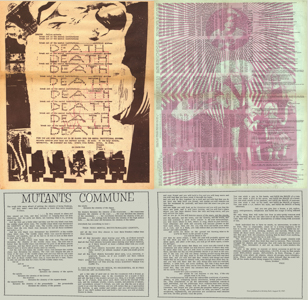
"Mutants Commune" in the Berkeley Barb, August 18, 1967. One of the
foundational texts of the Digger Movement. [Click image to zoom in. Then
click again to zoom out.]
|
Group Archive
Every message ever sent to DiggerBread — going back to when we moved
onto Google Groups — is kept in a searchable web archive, so nothing
gets lost the way old emails can when a hard drive dies or a mail
program gets replaced. To browse it, sign in at
groups.google.com
and click on DiggerBread; conversations are threaded, so you can follow
a whole discussion in one place instead of hunting through your inbox
for replies. There's also a search box at the top of the group page if
you're trying to track down a particular post, whether it's about a
fundraiser, a memorial, or somebody's recipe for digger bread itself.
[Top] |

Communication Company broadside announcing the longest lasting of the Digger
free stores, named after "Trip Without a Ticket" (another of the
foundational texts of the Digger Movement). [Click image to zoom in. Then
click again to zoom out.]
|
"I Can't See
Anything"
If you go to the group's page and it looks empty, or Google tells you
the group doesn't exist, it's almost always one of these:
- Wrong Google account. If you have more than one Google/Gmail
account, you may be signed in with a different one than the address
we have on file for DiggerBread. Check which account you're signed
in as (top right corner of the screen) and switch to the right one.
- Not a confirmed member yet. Being invited and accepting
the invitation are two different steps — if you never clicked "Join
group" or confirmed the invite email, Google won't show you the
group's contents.
- Browser hiccups. Google Groups can be finicky about
cached logins. Try signing out of Google entirely, clearing the
page, and signing back in, or just open groups.google.com in a
private/incognito window.
If you've checked all of the above and you're still stuck, just email
the group's manager directly and we'll sort it out on our end.
[Top] |
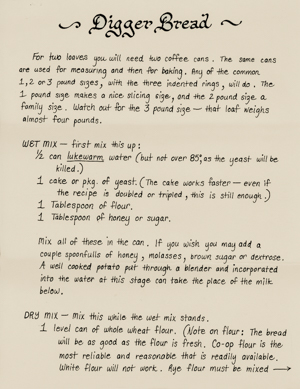
The Diggers started baking whole wheat bread after an engineer from Palo
Alto bought 500 pounds of flour and brought it to All Saints Church on
Waller Street in June, 1967 and showed how it was done. There were no
baking pans so coffee cans were used instead, thus inaugurating the
Free Bakery and the
signature mark of Digger Bread. This recipe was one of the first that
was printed. [Click image to zoom in. Then click again to zoom out.]
|
"I Don't Have Gmail..."
How Can I Create a Google Account?
You don't need to switch your everyday email over to Gmail to use
DiggerBread — you just need a free Google account attached to whatever
address you already use. Google lets you register any existing email
address (Yahoo, Comcast, your own domain, whatever) as a Google account,
so mail keeps arriving where it always has.
- Go to
accounts.google.com/signup.
- When it asks for a username, look for a link along the lines of
"Use my current email address instead" and click it — this skips
creating a new @gmail.com address.
- Enter your existing email address, then pick a password for your
new Google account (this can be different from your email password).
- Google will send a verification code to that email address;
enter it to confirm the account.
- Once you're verified, sign in at
groups.google.com with that same email address and password, and
you should be able to see DiggerBread.
If Google insists on creating a Gmail address along the way, that's
fine too — you don't have to use it for anything. It'll just sit there
unused while your regular email keeps working as DiggerBread's messages
continue arriving in your usual inbox.
[Top] |
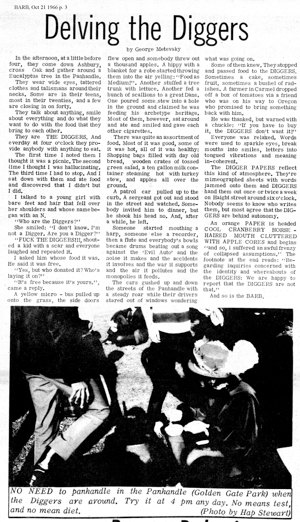
"Delving the Diggers" was the first mention of the Digger
phenomenon in the underground press. The byline of "George Metevsky" was
one of Emmett and Billy's favorite pseudonyms. (Berkeley Barb, October
21, 1966) [Click image to zoom in. Then click again to zoom out.]
|
| | |
|
|
|
|
|
|
![High-Res Image]()
|